3x Faster, 92% Cheaper: How We Scaled Isomer Next for Government Websites
optimization
nextjs
codebuild
opengovsg
Originally published on OpenGovSG’s Substack.
Citizens and agencies depend on government websites for information, policies, and services. When those sites are slow or hard to update, everyone is affected—content editors can’t verify changes quickly, agencies hesitate to publish often, and people on slow networks wait longer for the information they need.
At Open Government Products (OGP), we build technology for the public good, and are driven by our mission to accelerate the digital transformation of the Singapore Government. Isomer, our platform for government websites, helps agencies set up sites that are secure, reliable, and accessible. Isomer Next is our rebuilt website platform that’s faster and costs less to run.
One of our largest ministerial sites runs on Isomer Next. Previously, publishing an update used to take half an hour—an extreme case, but it showed what was at stake. Without a fix, large sites would stay slow and costly, and more agencies couldn’t adopt the platform. We had to fix it.
Why Scale Matters for Government Websites
This site, which has 11,000 pages and close to 10M visits per year, is our most demanding government website on the platform. When we pushed it to production, we hit three problems that threatened scalability for every large site that would follow:
- Extremely slow build times
Every content update triggered a full site rebuild, taking more than 30 minutes even on our largest build machine. Content teams waited half an hour to see updates go live. - High cost per build
Each build costs around S$10, making frequent updates expensive and unsustainable for agencies. - Ballooning site size
The generated website files grew to 145GB—about the size of 30 HD movies. This means that every update, even a small one, requires us to upload and store the equivalent of 30 HD movies again. As a result, publishing changes takes longer and storage costs increase. It also slows down how quickly pages can be delivered to users, especially for people on older phones or slow internet connections, who often rely the most on government websites for timely information.
Collectively, these issues threatened the platform’s scalability as more large sites joined Isomer Next.
How Isomer Next is Built
Isomer Next is built on Next.js and uses the App Router with React Server Components (RSC). By rendering components on the server, it reduces the amount of client-side JavaScript, resulting in faster page loads and smaller bundles. The entire site is statically generated (SSG) at build time.
That static site is built during content publishing via CodeBuild, then uploaded to S3 and served via CloudFront. Because there’s no live server or database to overload, traffic spikes and even DDoS-style load are absorbed by the CDN—pages are served from the edge, and sites stay up when citizens need them. Fewer moving parts also mean fewer runtime vulnerabilities and less operational overhead.
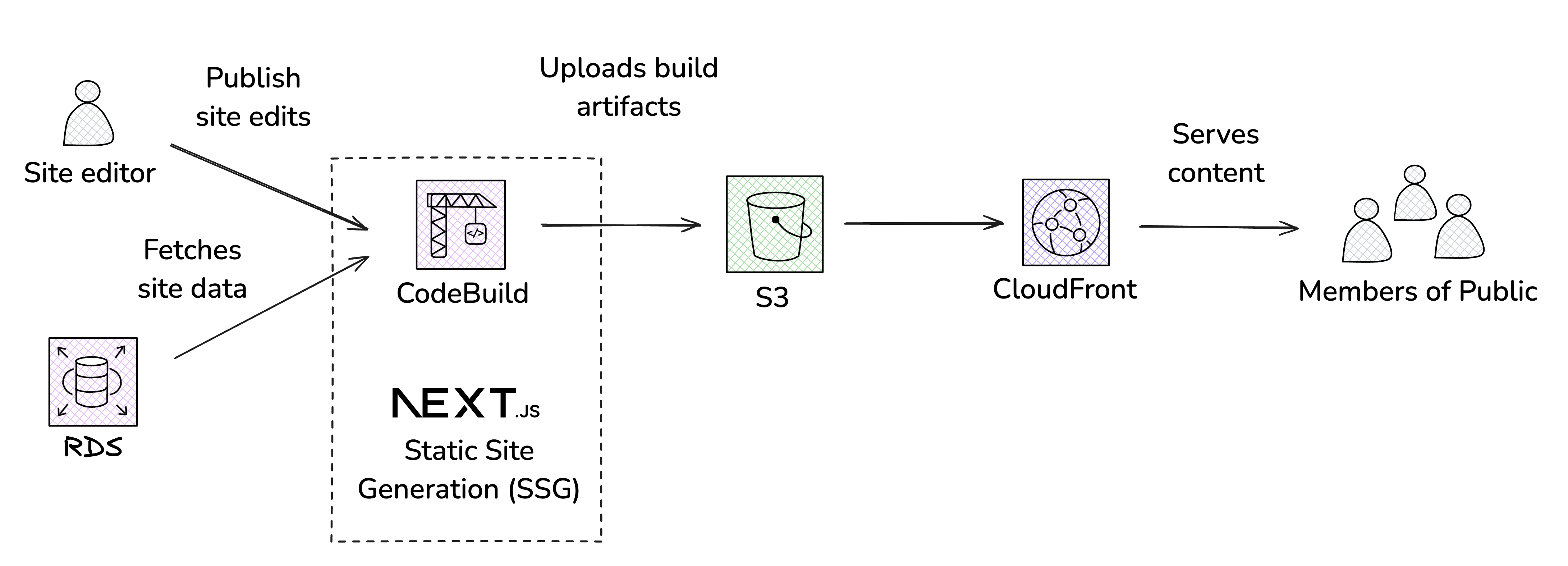
We profiled each step of the CodeBuild process:
| Step | What it does | Time taken |
|---|---|---|
| 1. Setup | Pulling from GitHub and installing dependencies | 3 minutes |
| 2. Fetch | Retrieving site data and preprocessing | ~30 seconds |
| 3. Build | Generating the static site using next build |
10 minutes |
| 4. Upload | Pushing artifacts to S3 | 15 minutes |
How We Did It — Technical Breakdown
We (1) moved data to the server with React Server Components to shrink artifacts 145GB to 7GB, (2) increased S3 upload concurrency, (3) switched to ARM/Graviton builds for 22–25% faster + cheaper, (4) cached node_modules to S3, and (5) upgraded to Next.js 15 for ~40% faster SSG.
1. Reducing Client-Side Data Transfer with React Server Components
S3 uploads were slow because artifacts were 145GB. That’s the equivalent of ~13MB per page, which is clearly excessive. Much of this bloat came from unnecessary client-side data.
Solution: We pushed more computation to the server during next build, restructuring components using React Server Components (RSC):
- Data stays server-side: Non-interactive components remain fully server-side.
- Minimal client props: Interactive components receive preprocessed, lightweight props.
Before:
"use client";

const MyComponent = (largeDataProp) => {
  // do something and render
};
After:
// MyComponent.tsx

const MyComponent = (largeDataProp) => {
  // computed during build time
  const smallProp = compute(largeDataProp);

  return MyComponentClient(smallProp);
};

// MyComponentClient.tsx

"use client";

const MyComponentClient = (smallProp) => {
  // do something and render
};
The measurable impact
This approach delivered huge downstream benefits:
- Artifact size: 145GB → 7GB (92% reduction)
- S3 upload time: 15 min → 3 min (80% reduction)
Additional side effects:
- CloudFront egress: ~73% reduction
- Page load time: 87% faster
2. Increasing S3 Upload Concurrency
While a 3-minute upload to S3 sounds impressive, we saw room for improvement given that our artifact size is 7 GB.
A closer look at the documentation revealed that our deployment scripts were using S3’s default max_concurrent_requests of just 10.
Solution: We increased concurrency to fully leverage our build machine.
Result: Upload time dropped 3× (3 min → 1 min) for 7GB artifacts - a solid and reasonable improvement!
3. Switching to ARM (AWS Graviton) Build Containers
We migrated our builds from x86 to ARM-based containers powered by AWS Graviton.
AWS Graviton (ARM) processors are specifically optimized for cloud workloads, offering better performance per dollar than equivalent x86 instances thanks to their architectural efficiency.
From research and community benchmarks, modern build tools like Node.js, Rust, and SWC tend to run very efficiently on ARM. Since SWC (Rust) and Node.js are central to Next.js builds, this indicates that ARM often compiles and transforms code faster in real-world workloads.
In our benchmarks, builds on ARM ran 22–25% faster compared to x86 instances of the same tier.
| Instance | XLarge | 2XLarge |
|---|---|---|
| Linux (x86) | 20.5 min, $1.888 | 16.5 min, $4.125 |
| ARM | 15.5 min, $0.93 | 13 min, $1.17 |
With this performance boost, we were able to downgrade from Linux 2XL to ARM XLarge, cutting compute costs by 77% while achieving an additional 6% faster build execution, all thanks to a single line of configuration change.
4. Caching node_modules Dependencies
Installing dependencies took ~170s per build due to CodeBuild’s ephemeral environment.
This was because each build runs in a fresh, isolated environment, with no artifacts carried over or shared. Also, CodeBuild’s built-in cache is temporary and operates on a best-effort basis, making it unreliable. As a result, dependency installation became a major bottleneck and wasted significant compute time.
Solution: Implemented a simple custom caching to S3 based on release tag. On subsequent builds, unchanged modules are retrieved instead of reinstalled.
Result: Dependency installation dropped from 170s → 8s (95% reduction), shaving minutes off nearly every build.
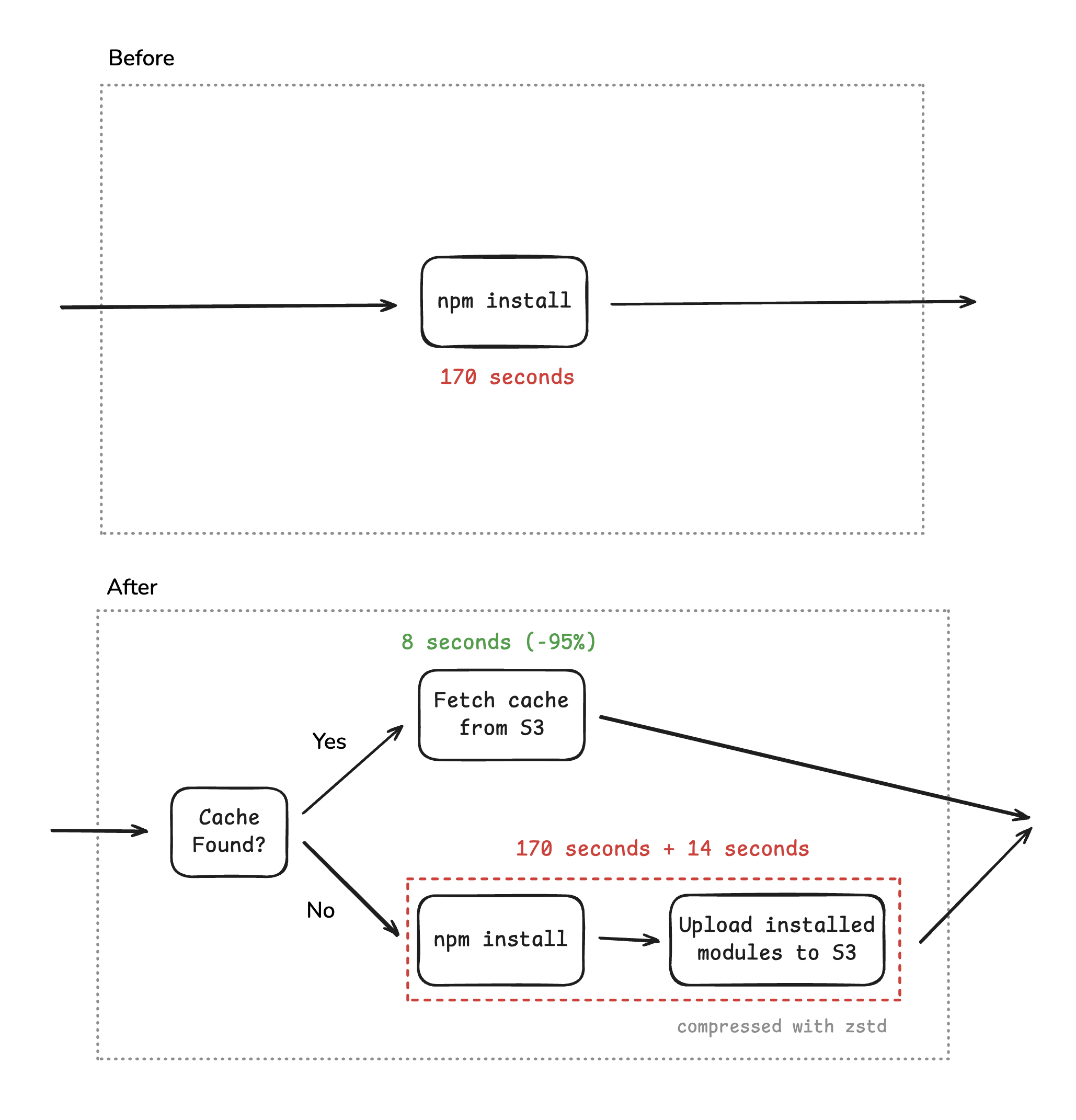
Note: Cold builds incur an additional 14 seconds to upload modules to S3. Looking back at 2025, the aggregated cache hit rate is really high: 99.87% of runs pulled from cache.
5. Upgrading to Next.js v15
Next.js 15 introduced notable improvements to Static Site Generation (SSG) for app router.
From Next.js documentation: Previously, our static optimization process rendered pages twice—once to generate data for client-side navigation and a second time to render the HTML for the initial page visit. Now, we reuse the first render, cutting out the second pass, reducing workload and build times.
After upgrading, SSG execution became ~40% faster (from 10 minutes to 6 minutes), helping reduce the build time for massive sites like this one. This upgrade also aligned us with the latest tooling, reducing long-term maintenance efforts.
The Turnaround: What We Achieved in 2 Weeks
After two weeks of focused engineering work, the site’s estimated annual cost saw a 95.6% reduction.
What does this mean in practice? Content teams can publish and verify updates in minutes instead of half an hour. Agencies can update their sites more frequently without major cost increases. Pages load faster on low-end devices and slow connections, helping citizens access information more quickly, especially on mobile. CloudFront costs also dropped significantly.
Crucially, these optimisations benefit all agencies. Most sites now complete a full build in ~2 minutes, costing just S$0.04 per build—a sustainable model at nationwide scale, translating into millions in potential savings across the government.
What This Unlocks for Singapore
Scaling Isomer Next means every agency can run a fast, affordable government website—without the build times or costs that used to block adoption. For citizens, that’s fewer delays and more reliable access to the information they need when they need it. That’s what we’re building toward: a government that works at the speed of the people it serves.